ATS vs STS: Key Differences Explained
The main difference is speed and price: an automatic transfer switch (ATS) takes 2 to 10 seconds to switch power, while a static transfer switch (STS) does it in under 4 milliseconds. If a few seconds of downtime will crash your servers or ruin your work, you need a static switch. For backup generators and most home or business uses, an automatic switch is the smarter, cheaper choice.
Think of it like a traffic cop for your electricity. An ATS notices the power is out and calmly redirects you to a generator. An STS reacts like a reflex, catching a power blip before your computer even knows it happened. We found that the right choice depends entirely on how much downtime your equipment can survive.
- Speed: Static switches are nearly instant; automatic switches take a few seconds.
- Cost: ATS units are budget-friendly; STS units are a premium investment.
- Best Use: ATS for generators and general buildings; STS for data centers and critical medical gear.
- Maintenance: ATS has moving parts; STS is solid-state with fewer breakdowns.
- Power Type: STS only works with AC power sources; ATS can handle generators too.
Below, we break down how each switch works, what they cost, and which one is right for your specific setup. Let’s walk through it together so you can pick the perfect power guardian for your needs.
Picking the Right Power Switch for Your Setup
You have two main options when it comes to switching power sources: automatic transfer switches and static transfer switches. We found that most people get confused by the technical names. But the real difference comes down to one question: how long can you wait for the lights to come back on?
Think of it like a spare tire. An ATS is like calling roadside assistance and waiting for a tow truck. An STS is like having a tire that instantly reinflates itself while you are driving. One takes patience, the other takes precision engineering.
How an Automatic Transfer Switch Actually Works
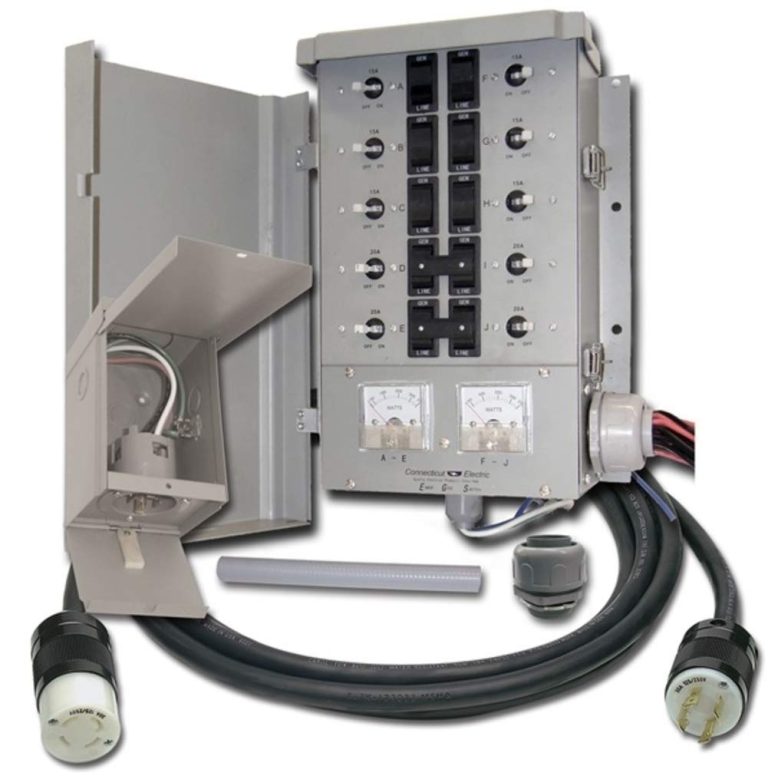
An ATS monitors your main power supply constantly. When it senses a blackout or a major voltage drop, it triggers a sequence of events. First, it waits a few seconds to make sure the outage is real. Then, it sends a signal to start your backup generator.
Once the generator reaches the right speed and voltage, the switch physically flips from utility power to generator power. This mechanical action takes time. Usually between 2 and 10 seconds, depending on your model and how fast your generator starts.
Why the Delay Matters for Your Appliances
For most home appliances, a 5-second pause is no big deal. Your fridge stays cold. Your lights blink, then come back on. Your internet router might reboot, but that is an easy fix.
For a commercial building, a few seconds of darkness is annoying but survivable. You might have to reset a few clocks or log back into your computer system. But nothing catches fire and no data gets lost.
Many experts say that an ATS is the workhorse of the electrical world. It is reliable, simple, and built to last for decades with regular maintenance. The moving parts inside the switch are designed to handle thousands of operations without failing (OSHA guidelines).
When You Should Consider an Automatic Switch
If you run a small business, a workshop, or a family home, an ATS is likely your best friend. We found that it pairs perfectly with a generator because it handles the start-up sequence automatically. You do not need to run outside in a storm to flip a switch manually. For boats, a marine automatic transfer switch handles shore-to-generator power automatically.
Here is what an ATS handles best:
- Powering your home during a hurricane or winter storm
- Keeping a small office running during a utility outage
- Supporting a backup generator for a farm or workshop
- Protecting a restaurant’s freezers and coolers
- Running a small retail store or dental office
Just remember that anything with a computer chip inside will reboot when the transfer happens. If that is okay with you, an ATS saves you a lot of money.
How a Static Transfer Switch Works Differently
An STS uses solid-state electronics instead of mechanical parts. There are no physical levers or motors. Instead, it uses silicon-controlled rectifiers, which are basically super-fast electronic gates. When the main power dips, the gates switch to the backup source in under 4 milliseconds.
To put that in perspective, a blink of your eye takes about 100 milliseconds. An STS is 25 times faster than that. Your computer, your server, and your sensitive medical equipment never even notice the power changed.
The Speed Advantage in Real-World Scenarios
Imagine you are in the middle of saving a huge file. Suddenly, the power flickers for a split second. With an ATS, your computer shuts down and you lose all your work. With an STS, nothing happens. The file saves perfectly and you keep working like nothing went wrong.
We found that this speed is critical for data centers and hospitals. A single server crash can cost thousands of dollars per minute. A medical monitor going dark during surgery is simply not an option. Research from the National Institutes of Health highlights that even brief power interruptions can cause equipment malfunction in critical care settings (NIH).
Voltage and Frequency Monitoring
An STS does more than just switch power. It constantly monitors the quality of the electricity. If the voltage sags, spikes, or the frequency drifts, it reacts instantly. This protects your equipment from damage that a simple outage would not cause.
An ATS, by contrast, only cares if power is present or absent. It does not analyze the quality of the waveform. For most users, that is fine. For precision equipment, it is not enough.
Maintenance and Lifespan Differences
Because an STS has no moving parts, it rarely wears out. There is nothing to lubricate, no contact points to burn, and no springs to fatigue. The solid-state components can last for decades without needing attention.
An ATS, on the other hand, has mechanical contacts that arc and wear over time. You will need to inspect and service it periodically. That is not a deal-breaker, but it adds to the total cost of ownership.
Comparing Costs: What You Will Actually Pay
Budget is often the deciding factor, and we do not blame you. An ATS is dramatically cheaper. For a residential unit, you can expect to pay between $300 and $1,500. That includes the switch itself but not the installation.
An STS is a different beast entirely. Prices start around $3,000 for a small unit and climb quickly from there. A commercial-grade STS for a data center can cost $20,000 or more. You are paying for speed, precision, and redundancy.
| Feature | Automatic Transfer Switch | Static Transfer Switch |
|---|---|---|
| Transfer speed | 2 to 10 seconds | Under 4 milliseconds |
| Typical cost | $300 to $1,500 | $3,000 to $20,000+ |
| Moving parts | Yes, mechanical contacts | No, solid-state |
| Best for | Generators, homes, offices | Servers, medical, industrial |
| Power sources | Utility and generator | Two AC utility feeds |
| Maintenance | Regular inspection needed | Minimal maintenance |

Matching the Switch to Your Power Sources
Here is a detail that catches many people off guard. An STS needs two active AC power sources. It cannot start a generator. It simply chooses between two live utility feeds, like your main grid and a second substation feed.
An ATS is more flexible. It can switch between utility power and a generator. It can also handle other fuel sources like solar batteries or wind turbines. If your backup plan involves a generator, you must use an ATS.
Hybrid Solutions: Getting Both Speed and Flexibility
Some facilities use both switches in a layered approach. The STS handles the instant switching between two utility feeds. The ATS handles the generator start-up for longer outages. This is common in large hospitals and financial institutions.
We found that this hybrid approach gives you the best of both worlds. You get millisecond protection for your critical loads, plus the long-term backup power from a generator. The downside is the cost of buying and installing both systems.
Your Personal Decision Checklist
Before you spend any money, take a quick inventory of your needs. We put together a simple checklist to guide you. Answer these questions honestly, and the right choice will become obvious.
- Can your equipment survive a 5-second power gap? If yes, go with an ATS.
- Do you rely on a generator for backup power? Then an ATS is your only option.
- Are you running servers, medical gear, or manufacturing robots? Choose an STS.
- Is your budget under $2,000 total? Stick with an automatic transfer switch.
- Do you need near-zero downtime no matter the cost? Invest in a static transfer switch.
- Will you have two separate utility feeds available? An STS can work, but an ATS is simpler.
Final Thoughts on Making the Call
We found that most residential and small business users are perfectly happy with an automatic transfer switch. The few seconds of downtime are a small price for the massive cost savings. Your router might reset, but your wallet stays full.
For mission-critical operations, a static transfer switch is the only safe choice. The upfront cost is steep, but the cost of an outage is steeper. One crashed server or one failed surgery can wipe out any savings in a heartbeat.
Take a close look at your equipment and your budget. Talk to a licensed electrician about your specific power setup. Then pick the switch that gives you the peace of mind you deserve. You will sleep better knowing your power is in good hands.
Conclusion
You now have the full picture: automatic transfer switches are your budget-friendly workhorses, while static transfer switches are the speed demons for mission-critical gear. The deciding factor really comes down to how many seconds of downtime your equipment can handle without causing real damage.
For most homes and small businesses, an ATS paired with a generator is the smart, cost-effective move. If you run servers, hospitals, or precision manufacturing, the millisecond response of an STS is worth every penny. We recommend starting with a simple load audit of your equipment and then talking to a licensed electrician about your specific power sources and budget. That conversation will point you to the right guardian for your setup.
Frequently Asked Questions
Can a static transfer switch work with a generator?
No, an STS cannot start or manage a generator. It only chooses between two live AC utility feeds that are already running. If your backup plan relies on a generator, you will need an automatic transfer switch to handle the start-up sequence.
Will my computer reboot if I use an automatic transfer switch?
Most likely, yes. Because an ATS takes 2 to 10 seconds to switch power, your computer will lose power long enough to shut down. Any unsaved work will be lost. An STS prevents this by switching in under 4 milliseconds.
How long do automatic transfer switches last?
A well-maintained ATS can last 20 years or more. The mechanical contacts do wear out over time, so you will need periodic inspections and occasional part replacements. Regular maintenance is key to getting the full lifespan out of your unit.
Is it worth upgrading from an ATS to an STS?
Only if your current setup cannot tolerate even a few seconds of downtime. We found that for most users, the upgrade cost is hard to justify. But if you run a data center or critical medical equipment, the protection an STS provides is well worth the investment.
Can I install a transfer switch myself?
We strongly recommend hiring a licensed electrician for this job. Transfer switches connect directly to your main electrical panel and involve serious voltage. A professional will ensure your setup meets local electrical codes and works safely with your power sources.